
What is a .lottie file (dotLottie)?
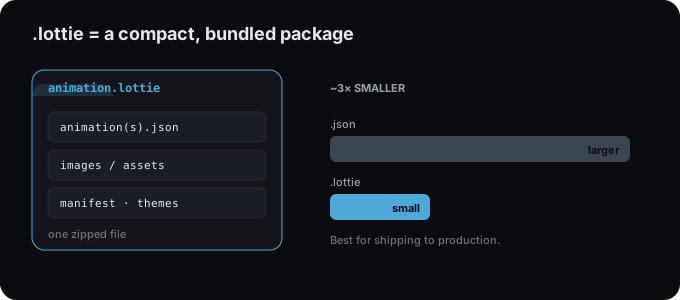
A .lottie file is a compact, zipped package for Lottie animations: about 3× smaller than .json, able to bundle multiple animations, assets, and themes.
- #dotlottie
- #lottie
- #concept
- #export
A .lottie file (called dotLottie) is a packaged, compressed version of a
Lottie animation. Where a plain .json is the raw, human-readable description, a
.lottie is a small ZIP archive that wraps one or more animations together
with any images, themes, and a manifest. Typically about 3× smaller than the
equivalent JSON.
Why it exists
Raw Lottie JSON is great for editing and universal compatibility, but it can get large and it can only hold a single animation. dotLottie solves both:
- Smaller downloads. Compression cuts file size dramatically, ideal for production.
- Bundling. One file can carry multiple animations plus their assets.
- Themes & metadata. The manifest can describe variants and playback defaults.
.lottie vs .json, which to use
Use .lottie when shipping to production and your player supports it; use
.json for maximum compatibility or quick copy-paste. Full breakdown:
dotLottie vs Lottie JSON.
How to get one
In Lottie Max, click Export → Download .lottie. It’s generated in your browser, nothing is uploaded. See the full export guide.
Playing a .lottie
Modern players read it directly, for example @lottiefiles/dotlottie-react on
the web, or the dotLottie web component for plain HTML. If you need a runtime that
only understands raw JSON, export .json instead.
Try it in the studio
No account, nothing to install. It runs in your browser.