
Export your Lottie: .json, .lottie, and embed
Understand every export option in Lottie Max: Lottie JSON, dotLottie, HTML embed, background, looping, and re-openable project files.
- #export
- #lottie
- #dotlottie
- #embed
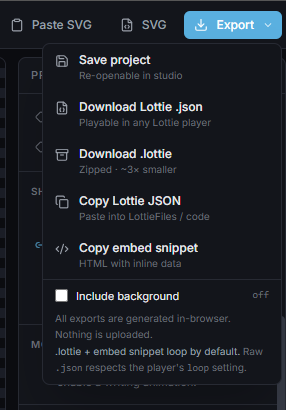
When your animation is ready, click Export (top-right). Everything is generated in your browser, nothing is uploaded.
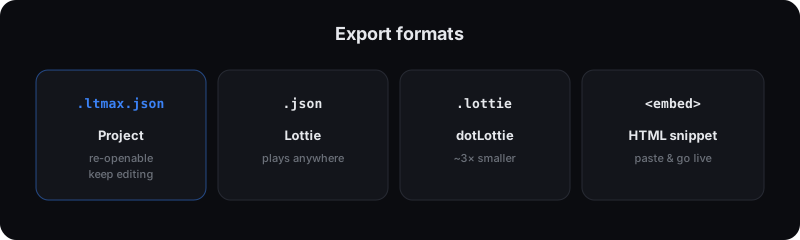
The options
- Save project, a re-openable
.ltmax.jsonfile. This is your editable source; open it later to keep working. (Works even on an empty canvas, so you can save a setup as a starting template.) - Download Lottie .json: standard Lottie, plays in any Lottie player.
- Download .lottie: the zipped dotLottie format, ~3× smaller. Best for shipping to production.
- Copy Lottie JSON, straight to your clipboard for pasting into code or LottieFiles.
- Copy embed snippet, a ready-to-paste HTML block using
<lottie-player>. Drop it into any page and the animation is live.
Background: transparent or baked in
By default exports are transparent, ideal for placing the animation over any background. Toggle Include background in the export menu to bake the canvas background color into the file.
Looping
- .lottie and the embed snippet loop by default.
- A raw .json respects the player’s own loop setting (e.g.
lottie.loadAnimation({ loop: true })in lottie-web).
Using the embed snippet
Paste the copied snippet into any HTML page:
<lottie-player autoplay loop style="width: 320px; height: 320px"
  src="data:application/json;base64,..."></lottie-player>
<script src="https://unpkg.com/@lottiefiles/lottie-player@latest/dist/lottie-player.js"></script>
The animation data is inlined, so there’s no separate file to host.
Re-opening a project
To keep editing later, use Save project to get the .ltmax.json, then on
the home page choose Open project (or drag the file onto the canvas). Note:
an exported Lottie is playback-only. It can’t be re-opened for editing, so keep
your .ltmax.json project file safe.
What’s next
That’s the full workflow, from blank canvas to shipped Lottie. Revisit animating with presets for more motion ideas.
Try it in the studio
No account, nothing to install. It runs in your browser.