
Is Lottie good for performance?
Lottie is usually a performance win: small vector files instead of heavy media. Here's when it's fast, when to be careful, and how to keep it smooth.
By The Lottie Max team
Published 1 min read
- #lottie
- #performance
- #concept
- #optimization
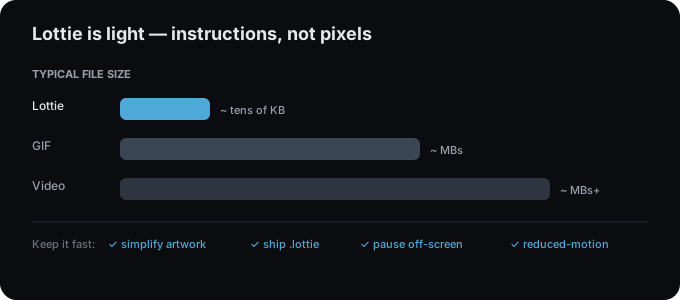
Mostly, yes. Lottie replaces heavy GIFs and videos with tiny vector files, which is good for load time. But like anything that runs every frame, it can be misused. Here’s a realistic picture.
Why it’s usually fast
- Small files download quickly, kilobytes instead of megabytes.
- No layout thrash, the player draws to its own SVG/canvas surface.
- One request, a single JSON (or
.lottie) versus many image frames.
When to be careful
- Too many at once. Dozens of simultaneously animating Lotties on one screen add up. Pause off-screen ones.
- Heavy effects. Large blurs and many drop shadows are the most expensive things to render.
- Huge canvases. A full-screen SVG render with thousands of points costs more than a small icon.
How to keep it smooth
- Simplify artwork. Fewer layers and points = less per-frame work. Flatten what you don’t animate when you import from your tool.
- Choose the right renderer. SVG is crisp; canvas can be faster when there are many shapes.
- Ship
.lottie. The dotLottie format is ~3× smaller, see dotLottie vs Lottie JSON. - Lazy-load and pause. Only play what’s visible; pause when scrolled away.
- Respect reduced motion. Honor
prefers-reduced-motionfor accessibility.
The bottom line
For UI motion, icons, loaders, illustrations. Lottie is typically the lightest option available, and lighter than GIF or video. Keep files lean and you’ll keep frame rates high. Build an optimized one in the studio.
Try it in the studio
No account, nothing to install. It runs in your browser.