
Keyframe animation and easing basics
Go beyond presets. Set keyframes for position, scale, rotation, and opacity, then shape the timing with easing for natural motion.
- #keyframes
- #easing
- #animation
- #advanced
Presets get you 80% of the way; keyframes give you full control. A keyframe pins a property to a value at a moment in time. Lottie Max interpolates between them.
Drop your first keyframe
- Select a layer.
- Move the playhead in the timeline to where you want the motion to start.
- In the Properties panel, change a value (drag the layer, set scale, etc.). Lottie Max auto-keyframes, a diamond appears on that property’s track.
- Move the playhead forward, change the value again. Now it animates between the two.
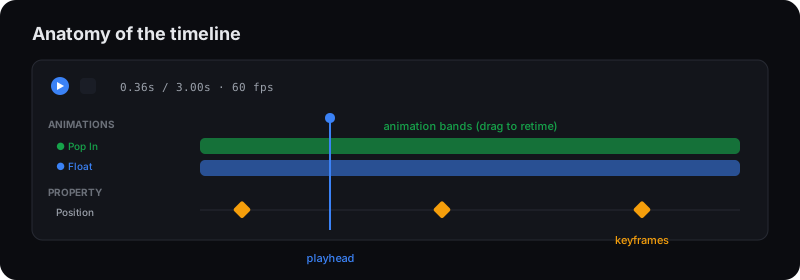
You can keyframe position, scale, rotation, opacity, and even fill / stroke color.
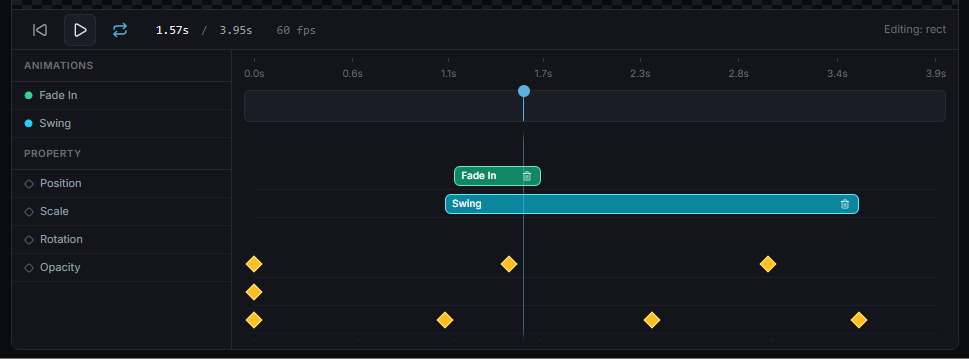
Edit keyframes
- Drag a diamond to retime it.
- Shift-click to multi-select, then drag them together.
- Right-click a diamond for easing options, delete, or reverse.
- Click the diamond in the Properties panel to add/remove a keyframe at the playhead.
Easing, the secret to natural motion
Linear motion looks robotic. Easing controls acceleration:
- Ease Out, fast then slow. Great for things arriving.
- Ease In, slow then fast. Great for things leaving.
- Ease In Out, smooth on both ends. The default for most UI motion.
- Linear, constant speed. Good for spins and continuous loops.
Right-click a keyframe to pick its easing. As a rule: entrances ease out, exits ease in, loops stay in-out or linear.
Frame stepping
Use the arrow keys to nudge the playhead one frame at a time (Shift = 10 frames, Home/End to jump to start/end) for precise placement.
What’s next
Layer a preset and hand-tuned keyframes together, or learn how gradients, strokes, and effects add polish.
Try it in the studio
No account, nothing to install. It runs in your browser.