
How Lottie animations work
Under the hood of Lottie: a JSON description of layers and keyframes that a player interpolates and renders to SVG or canvas at runtime.
- #lottie
- #concept
- #keyframes
- #advanced
A Lottie animation isn’t a video or a stack of images, it’s a set of instructions that a player turns into motion on the fly. Understanding the pieces makes you better at designing efficient, smooth animations.
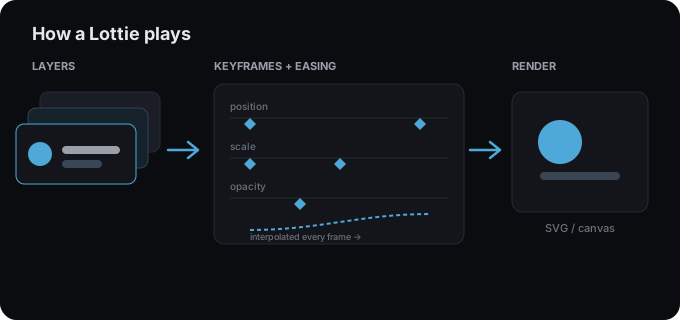
1. The JSON describes a scene
A Lottie file is JSON with three core parts:
- Composition: width, height, frame rate (fps), and duration (in frames).
- Layers: shapes, images, and text, stacked in order.
- Keyframes: values for properties (position, scale, rotation, opacity, colors, trim paths…) pinned to specific frames.
2. The player interpolates every frame
At runtime, the player (e.g. lottie-web or a dotLottie player) walks the timeline. Between two keyframes it interpolates, calculating in-between values, shaped by the easing on each keyframe. Linear easing looks robotic; ease in/out feels natural. This is exactly what you control in keyframes and easing.
3. It renders to SVG or canvas
The player draws each frame using vector shapes, usually via SVG (sharpest) or canvas (faster with many shapes). Because it’s vector, it’s resolution independent, no blur when it scales.
Special mechanics worth knowing
- Trim paths animate how much of a stroke is drawn, the basis of the signature write-on effect.
- Effects like drop shadow and blur are described too, though very minimal runtimes may skip them. See gradients, strokes & effects.
Why this design is efficient
Shipping instructions instead of pixels is what makes Lottie so light and scalable, see is Lottie good for performance? Ready to build one? Open the studio.
Try it in the studio
No account, nothing to install. It runs in your browser.