
What is Lottie? The animation format, explained
Lottie is a tiny, scalable, JSON-based animation format that plays on web and apps. Here's what it is, why designers use it, and how to make one.
- #lottie
- #basics
- #concept
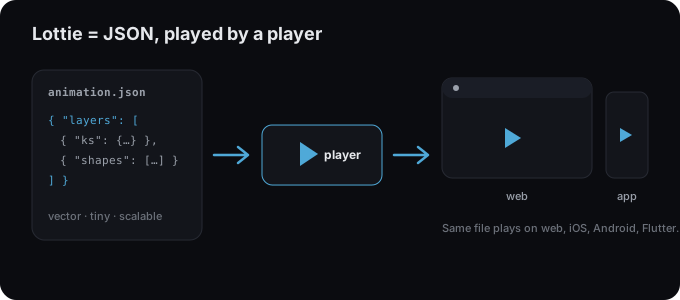
Lottie is an open animation format that stores motion as JSON, a small text description of shapes, layers, and keyframes, which a player renders in real time on the web, iOS, Android, and beyond. Because it’s vector and instruction-based (not a stack of images), a Lottie file stays crisp at any size and is usually a fraction of the weight of a GIF or video.
Why designers and developers use it
- Tiny files. Vector instructions compress far better than raster frames, often kilobytes instead of megabytes.
- Crisp at any size. It’s vector, so it scales to any screen or density.
- Interactive. Players can play, pause, loop, jump to segments, and react to scroll or hover.
- Cross-platform. The same file plays on web, native mobile, React Native, and Flutter.
What’s inside a Lottie file
A Lottie JSON describes the composition (size, frame rate, duration), the layers (shapes, images, text), and keyframes that animate properties like position, scale, rotation, and opacity over time. The player interpolates between keyframes every frame. Learn more in how Lottie animations work.
.json vs .lottie
You’ll see two file types. Plain .json is the universal original;
.lottie (dotLottie) is a compact, zipped package that’s about 3× smaller.
See dotLottie vs Lottie JSON.
How to make a Lottie
You don’t need After Effects. Lottie Max is a free, browser-based editor: draw or paste artwork from any design tool, animate it with presets or keyframes, and export a Lottie, all without uploading anything.
Where to use it
Anywhere you ship UI: loaders, icons, onboarding, empty states, and hero illustrations. See the integration guides for React, Next.js, Vue, Webflow, WordPress, and more.
Try it in the studio
No account, nothing to install. It runs in your browser.