
How to make a Lottie loading spinner
Build a lightweight, infinitely looping loading spinner as a Lottie and export it for web or app. Crisp, tiny, and smooth at any size.
- #loader
- #spinner
- #loop
- #use-case
A Lottie spinner is tiny, scales perfectly, and loops forever without the weight of a GIF. Here’s how to make one in Lottie Max.
1. Draw the spinner shape
Common options:
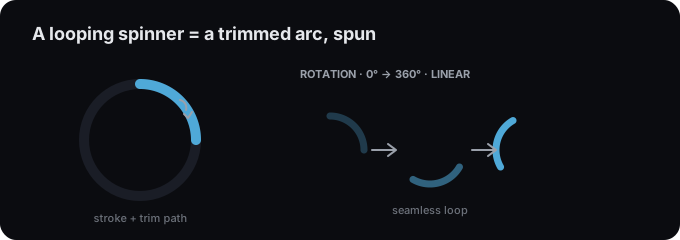
- An arc: draw an ellipse with a stroke, no fill, then use a trim path so only part of the ring shows.
- A ring of dots, draw one small circle and duplicate it around a center.
Style the stroke (cap = round looks smooth) in the styling guide.
2. Make it spin
Select the shape and apply the Spin loop preset, or set two rotation keyframes (0° → 360°) with linear easing so the speed stays constant, see keyframes and easing. Linear is key: easing makes a spinner look like it’s stuttering.
3. Keep it seamless
For a perfect loop, the last frame must match the first. A full 360° rotation does this automatically. Keep the composition short (e.g. 1-1.5s) so it feels brisk.
4. Export and loop
Export .lottie (loops by default) or .json, then enable
looping in your player. Drop it in via any integration guide, for
example React or plain HTML.
Tips
- Linear easing for constant speed.
- Round stroke caps for a polished arc.
- Small and short, spinners should feel instant.
Try it in the studio
No account, nothing to install. It runs in your browser.