
Integration · Web
How to add Lottie to an HTML page
For a plain website, the lottie-player web component is the simplest route. One tag and one script. Lottie Max can even hand you a self-contained snippet.
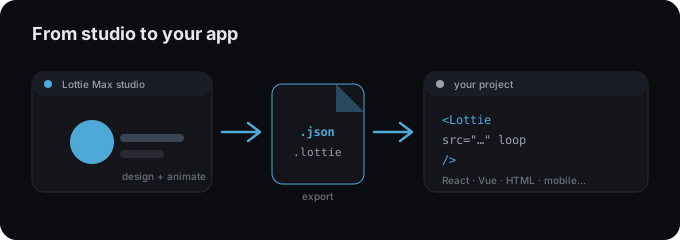
Add the animation
- 1 In Lottie Max, either Download Lottie .json or Copy embed snippet.
- 2 Add the lottie-player <script> once, near the end of your page.
- 3 Drop a <lottie-player> tag with the file path (or paste the copied snippet).
- 4 Set autoplay, loop, and size with the style attribute.
index.html
<lottie-player src="/animation.json" autoplay loop
  style="width: 320px; height: 320px"></lottie-player>

<script src="https://unpkg.com/@lottiefiles/lottie-player@latest/dist/lottie-player.js"></script>
Tips
- → The studio’s Copy embed snippet inlines the animation as base64. No file to host.
- → For the smaller dotLottie format, use the dotlottie-player component instead.
- → Host the .json anywhere static; reference it via the src attribute.
Need an animation first?
Design and export one in the studio. Free, in your browser.
FAQ
- Is Lottie Max free to use with plain HTML?
- Yes. Lottie Max is free and runs in your browser. Make the animation, export it, and drop it into your project.
- What file should I export for plain HTML?
- A Lottie .json works everywhere. For a smaller file, export .lottie (dotLottie, ~3× smaller) where the player supports it.
- Where do I get the animation file?
- Create it in the Lottie Max studio, then use Export to download .json / .lottie or copy a ready-to-paste embed snippet.