
How to create scroll-triggered Lottie animations
Drive a Lottie animation with scroll: play on view or scrub frame-by-frame as the user scrolls. Export from Lottie Max and wire it up with a few lines.
- #scroll
- #interactive
- #use-case
- #web
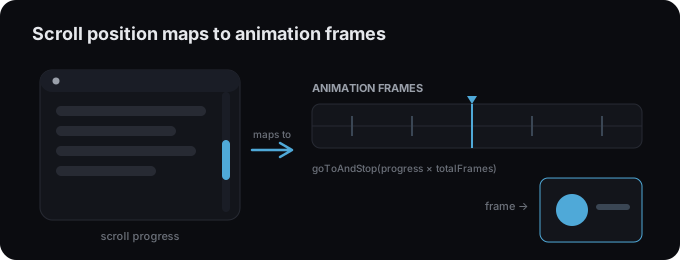
Scroll-triggered Lotties are a staple of modern landing pages, an animation that plays when it enters the viewport, or scrubs to your scroll position like a storyboard. Build the animation in Lottie Max, then drive it with a little code.
First, make and export the animation
Animate your scene and
export a .json. Note its total frames (composition
duration × fps), you’ll map scroll progress onto that range.
Option A, play when it scrolls into view
Use an IntersectionObserver to start playback once the animation is visible:
import lottie from "lottie-web";

const anim = lottie.loadAnimation({
  container: document.querySelector("#hero"),
  renderer: "svg",
  autoplay: false,
  loop: false,
  path: "/animation.json",
});

const io = new IntersectionObserver(([entry]) => {
  if (entry.isIntersecting) anim.play();
}, { threshold: 0.3 });

io.observe(document.querySelector("#hero"));
Option B, scrub frames with scroll position
Map how far the user has scrolled through a section onto the animation’s frames:
import lottie from "lottie-web";

const anim = lottie.loadAnimation({
  container: document.querySelector("#scrolly"),
  renderer: "svg",
  autoplay: false,
  loop: false,
  path: "/animation.json",
});

anim.addEventListener("DOMLoaded", () => {
  const section = document.querySelector("#scrolly");
  window.addEventListener("scroll", () => {
    const rect = section.getBoundingClientRect();
    const total = rect.height - window.innerHeight;
    const progress = Math.min(1, Math.max(0, -rect.top / total));
    anim.goToAndStop(progress * anim.totalFrames, true);
  }, { passive: true });
});
Tips
- Throttle with
requestAnimationFramefor buttery scrubbing on long pages. - Respect
prefers-reduced-motion, skip the effect for users who opt out (accessibility & performance). - Keep it light: scrubbing redraws often, so simplify the artwork.
- Using a framework? See the integration guides for React, Next.js, and more.
Try it in the studio
No account, nothing to install. It runs in your browser.